
Receive Workflow Webhooks
Instead of polling GET /api/service/workflow-executions/:id, register an HTTPS endpoint and Arcnem Vision sends it a signed event when an execution finishes. Your receiver verifies the signature, records the event, and fetches the result through the service API it already uses.
Webhooks cover workflow executions started with a service API key through POST /api/service/workflow-executions. Endpoints belong to that service key, and only its executions produce events.
Register an endpoint
Section titled “Register an endpoint”Choose whichever surface fits. All three manage the same endpoints.
-
Service API: call
POST /api/service/webhook-endpointswith the service key:POST /api/service/webhook-endpointsx-api-key: <service key>content-type: application/json{"url": "https://example.com/webhooks/vision"} -
Dashboard: open Projects & API Keys, find the service key, expand Webhooks, and add the URL.
-
MCP: with both
webhooks:readandwebhooks:manage, calllist_service_keysto find the key, thencreate_webhook_endpoint.
The response includes a signingSecret that starts with whsec_. It is shown only once. Store it with your receiver. A key can have up to five enabled endpoints.
Endpoint URLs must use HTTPS and resolve only to public addresses. Vision checks this when you register the endpoint and again before every delivery, connects only to the address it checked, and never follows redirects.
What your receiver gets
Section titled “What your receiver gets”Each delivery is a POST with a small JSON body and three Standard Webhooks headers:
webhook-id: evt_0199a1c4-7e2b-7c3a-9f10-2b6f0c1d9e44webhook-timestamp: 1790244903webhook-signature: v1,K5oZfzN95Z9UVu1EsfQmfVNQhnkZ2pj9o9NDN/H/pI4=content-type: application/json
{  "type": "workflow.completed",  "timestamp": "2026-09-24T10:15:03.412Z",  "data": {    "executionId": "0199a1c4-7e2b-7c3a-9f10-2b6f0c1d9e44",    "workflowId": "0198f0aa-51c2-7b11-8d3e-6a0e1f7c2b90",    "projectId": "0197e3b2-0c4d-7a55-a1f2-9b8c7d6e5f40",    "status": "completed",    "finishedAt": "2026-09-24T10:15:03.412Z",    "execution": "/service/workflow-executions/0199a1c4-7e2b-7c3a-9f10-2b6f0c1d9e44"  }}
The event type is workflow.completed or workflow.failed. The body carries identifiers only. It never includes prompts, graph state, document URLs or provider errors. Fetch the outcome with GET /api/service/workflow-executions/:id.
webhook-id stays the same for every retry and resend of an event. webhook-timestamp is new on each attempt.
Verify and acknowledge
Section titled “Verify and acknowledge”- Verify the raw body. Check the signature against the exact bytes you received, before parsing JSON. Reject requests whose timestamp is more than about five minutes from your clock.
- Deduplicate durably. Delivery is at least once, so save
webhook-idand ignore events you have already saved. - Acknowledge quickly. Return any
2xxonce the event is saved, and do the real work in the background. - Apply the outcome idempotently. Look up your own job by
executionId. A webhook can arrive before your start request returns, so tolerate a job you haven’t recorded yet.
A receiver using the standardwebhooks package with Hono:
import { Hono } from "hono";import { Webhook } from "standardwebhooks";
const webhook = new Webhook(process.env.VISION_WEBHOOK_SECRET!); // "whsec_…"const app = new Hono();
app.post("/webhooks/vision", async (c) => {  const raw = await c.req.text();  let event: { type: string; data: { executionId: string } };  try {    event = webhook.verify(raw, c.req.header()) as typeof event;  } catch {    return c.body(null, 400);  }
  const isNew = await saveEventOnce(c.req.header("webhook-id")!, event);  if (isNew) await enqueueJob("vision/execution.finished", event.data);  return c.body(null, 204);});
Without a library, the signature is v1, followed by the base64 HMAC-SHA256 of webhook-id + "." + webhook-timestamp + "." + body, keyed with the base64-decoded part of the secret after whsec_. The header can hold several space-separated signatures. Accept the request if any of them matches, using a constant-time comparison.
Retries and resend
Section titled “Retries and resend”- Retried automatically: network errors, timeouts,
408,429and5xx, a few times with backoff. - Not retried: any other response, including
4xxand redirects. The delivery is marked failed. - Timeout: each attempt has 10 seconds to receive response headers. The response body is ignored.
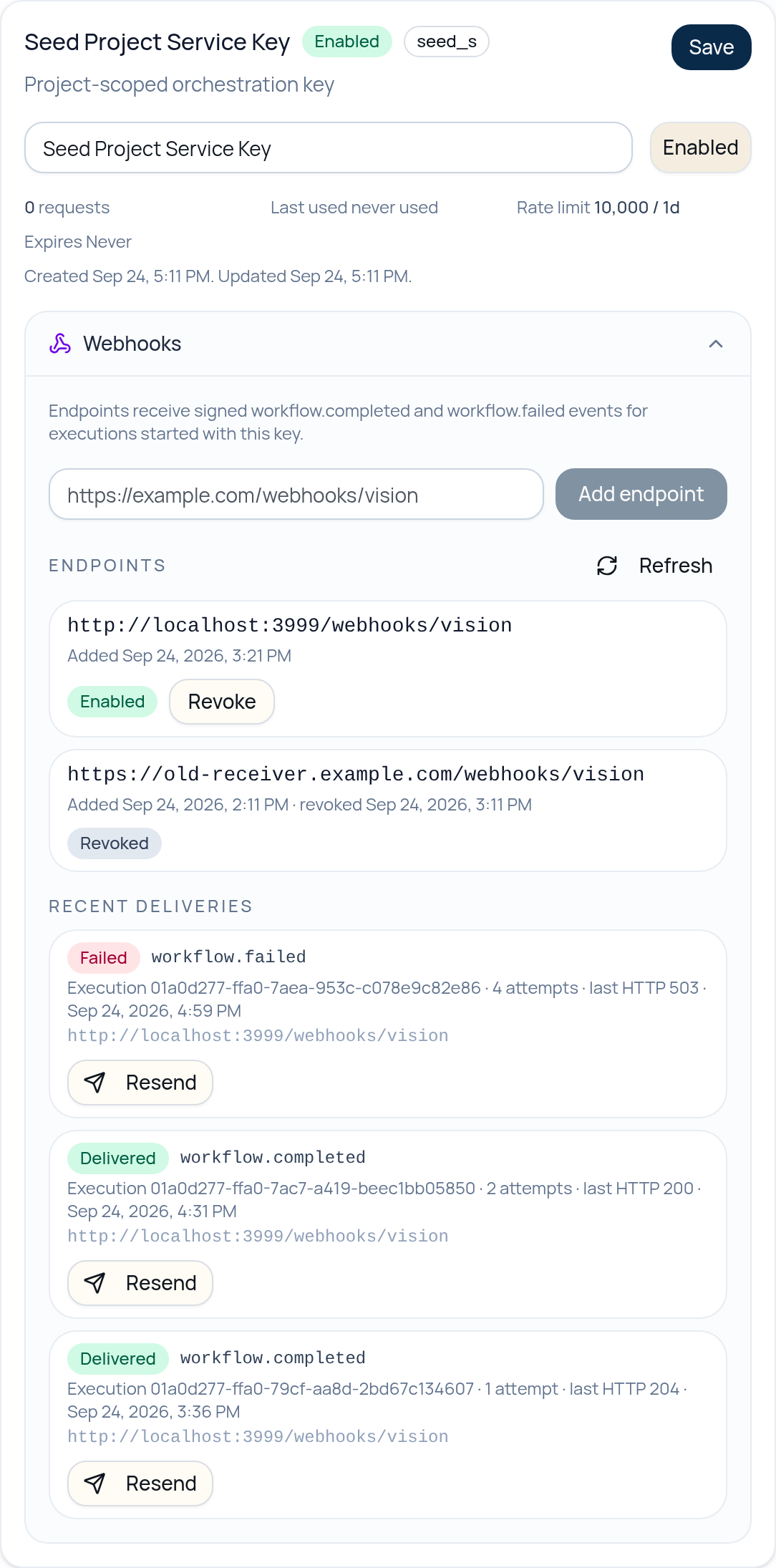
Every attempt is recorded. List them with GET /api/service/webhook-deliveries (filter by endpointId or executionId), in the dashboard under the key’s Webhooks section, or with list_webhook_deliveries over MCP.
To send an event again, use POST /api/service/webhook-deliveries/:id/resend, the dashboard’s Resend button, or resend_webhook_delivery. A resend keeps the same webhook-id and body, goes to the original endpoint, and never reruns the workflow. It supersedes any earlier attempt still in flight, so repeating a resend is safe.
Keep a slow status check as a fallback, for example for executions still running after an hour. It covers anything your receiver missed while it was down.
Revoke or rotate
Section titled “Revoke or rotate”DELETE /api/service/webhook-endpoints/:id (or Revoke in the dashboard, or revoke_webhook_endpoint over MCP) stops future deliveries and keeps the history. A request already in flight can’t be recalled.
URLs and secrets can’t be edited. To change either, register a new endpoint, deploy the receiver with its secret, then revoke the old endpoint. Events queued while both exist go to both, and receivers deduplicate them by webhook-id. Deliveries created before you registered an endpoint are not sent to it.
Deliveries for a disabled or expired service key, or a revoked endpoint, are cancelled at their next attempt instead of being sent.
Permissions
Section titled “Permissions”| Surface | Read endpoints and history | Register, revoke, resend |
|---|---|---|
| Service API key | webhooks: ["read"] |
webhooks: ["manage"] |
| MCP (OAuth) | webhooks:read |
webhooks:manage (plus webhooks:read to find keys and deliveries) |
| Dashboard | Organization member | Organization member |
Service keys include both webhook permissions by default.
Self-hosting
Section titled “Self-hosting”The API requires WEBHOOK_SECRET_ENCRYPTION_KEY at startup: 32 random bytes encoded as base64. It encrypts signing secrets at rest. The env examples include a development-only value; generate a separate key for each deployment with openssl rand -base64 32. Keep it stable: changing it makes existing secrets unreadable, so every endpoint would need replacing.
The local seed (bun run db:seed, which needs the same WEBHOOK_SECRET_ENCRYPTION_KEY in server/packages/db/.env) gives the Seed Project service key a demo endpoint at http://localhost:3999/webhooks/vision (SEED_WEBHOOK_RECEIVER_URL changes it; the Docker example uses host.docker.internal), with sample deliveries and a revoked endpoint. It prints the demo signing secret. Run a receiver on that port with the secret, then resend a delivery from the dashboard to watch it arrive.
Endpoints must use public https:// URLs. For a receiver on your own machine, the local env examples set WEBHOOK_ALLOW_PRIVATE_DESTINATIONS=true, which also allows http:// and private addresses. It is a local-only switch: the API refuses to start with it enabled unless BETTER_AUTH_BASE_URL is a local http:// URL, just like API_DEBUG.